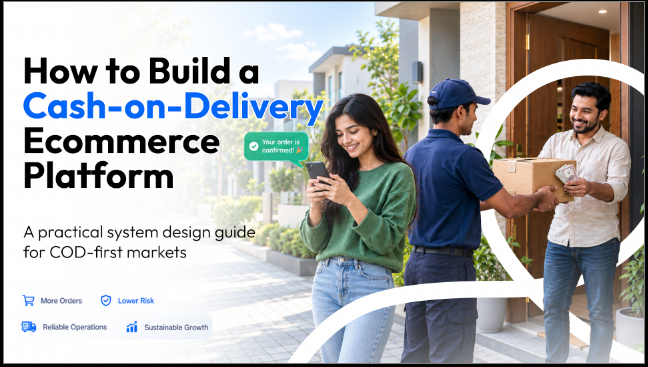
In a cash-on-delivery market an order is a promise, not a sale; the platform's real job begins after checkout, with confirmation, courier booking and collection
The phone number, not the e-mail address, is the customer's identity, and SMS, not e-mail, is the channel customers read.
Refused deliveries are the main cost. A confirmation step and a risk score per phone number are the two controls that reduce them.
Courier and payment integrations fail in the gaps between steps — save the courier's consignment number the moment it is issued, and never trust a payment gateway's browser redirect.
A mock of every external service makes the whole order journey testable before real money or real parcels are involved.
A cash-on-delivery ecommerce platform takes an order without taking a payment, confirms that the customer still wants it, hands the parcel to a courier who collects the cash at the door, and reconciles that cash back to the order — and it must do this across at least five external systems, from the SMS gateway to the courier's status feed, each of which can independently become the point where an order is lost.
The foundational choices — how a customer is identified, when an order counts as confirmed, which system owns the parcel's status, and how a message failure is handled — determine how many parcels come back unopened and how many hours staff spend re-typing addresses into a courier portal.
This guide covers the reference design a team needs to build cash on delivery as a genuine operating model, not as a payment option bolted onto a card-first store.
What Is a Cash-on-Delivery Ecommerce Platform?
A cash-on-delivery ecommerce platform is a commerce system in which the order is created before any money moves, payment is collected by a courier at the moment of delivery, and the software is responsible for every step in between: confirming intent, assessing risk, booking the parcel, tracking it, and recording the cash when it arrives.
The definition matters because it moves the centre of the system. In a card-first store the checkout is the climax; everything afterwards is fulfilment. In a cash-on-delivery store the checkout is the opening move. The customer has committed nothing, the retailer is about to spend a courier fee in both directions if the parcel is refused, and the commercially important software is the screen a staff member looks at ten minutes later.
Markets where this model dominates — Bangladesh, and much of South and Southeast Asia, the Middle East and Africa — share three further traits that shape the build: customers identify themselves by mobile number, they read SMS and messaging apps rather than e-mail, and delivery is priced and operated by local couriers with their own APIs and conventions.
Why Do Hosted Storefronts Fall Short in Cash-on-Delivery Markets?
Hosted commerce platforms are engineered for the median requirements of their customer base, and that median customer pays by card, has an e-mail address and ships with an international carrier. Each local difference can usually be patched with an app, but every app adds a recurring fee, a separate interface and its own copy of the order data — and the patches do not compose into a workflow.
Assumption in a card-first store
Reality in a cash-on-delivery market
What the platform must provide
Payment completes the order
Payment happens days later, at the door
An explicit confirmation state between "placed" and "shipped"
E-mail is the customer's identity
The mobile number is
Phone-based accounts, one-time codes, guest orders with no e-mail
E-mail receipts and updates
SMS is what gets read
Short, local-language SMS at every step
One shipping rate table
Delivery is priced by city zone
Zone-based fees and a free-delivery threshold as configuration
Fulfilment is a label purchase
Fulfilment is a booking with a local courier
Courier booking, tracking and status sync inside the order screen
Fraud means stolen cards
Fraud means fake or refused orders
A risk score per phone number before the parcel ships
The practical test is simple. If staff confirm orders in one tool, book couriers in a second and message customers from a third, the business is running its core workflow in the gaps between products. That workflow is the thing worth building.
The alternative is a platform the business owns outright. The architectural pattern behind that is covered in Headless Ecommerce Development: Complete Guide, and the underlying build-or-buy decision in Custom Software Development vs Off-the-Shelf Solutions.
What Does the Reference Architecture Look Like?
A headless design suits this problem because the storefront and the back-office workflow change at different speeds and for different reasons. A reference architecture includes the following components.
Commerce engine. Catalogue, cart, orders, promotions and inventory, with room for custom data models, API routes and scheduled jobs. An open-source engine such as Medusa provides these and keeps the custom workflow in the same codebase as the core.
Storefront. A server-rendered web application — Next.js is the common choice — that reads from the commerce API and is designed for phones first.
Operations interface. An admin extended with an order desk: what to confirm, what to ship, what is in transit.
Messaging service. An SMS provider behind a single internal function, with e-mail as a secondary channel.
Payment providers. Cash on delivery as the default, with local wallets and card gateways as alternatives.
Courier integrations. Booking, tracking and status updates for each courier the business uses.
Data and events. A relational database for records and a cache or event bus for background work.
Resist the instinct to distribute this across managed services on day one. A single-vendor store serving one country runs comfortably on one well-provisioned server with containers, a reverse proxy and automated backups. Record, in the code, every shortcut that depends on the single-server assumption — in-memory rate limiting is the usual example — along with the change required when the store scales out.
How Should Customer Identity Work Without E-mail?
Treat the mobile number as the primary key of the customer and design every entry point around it.
Normalise at the boundary. Customers type the same number in several forms — with a country code, with a plus sign, with spaces. Convert every number to one canonical form the moment it enters the system, store only that form, and match the common variants when querying older data.
The canonical form to standardise on is E.164, the ITU numbering plan that SMS gateways and courier APIs already expect.
    // One canonical form: 01XXXXXXXXX
    normalizePhone("+880 1712-345678")  // "01712345678"
    normalizePhone("8801712345678")     // "01712345678"
    normalizePhone("1712345678")        // "01712345678"
    normalizePhone("12345")             // null — reject, do not guess
Authenticate with one-time codes. Sign-up, sign-in and password reset should work from a code sent by SMS. Rate limit the request endpoint tightly, per IP address and per number, because each request costs money and an open endpoint is an invitation to abuse.
Make guests first-class. A customer who orders without an account and without an e-mail address is the normal case, not an edge case. If the underlying commerce engine requires an e-mail, generate an internal placeholder, never send mail to it, and never show it in the interface.
Believe the client's address carefully. Rate limits are only as good as the IP address they key on. Trust a forwarded-address header only when the request arrives from your own proxy; otherwise anyone can reset their own limit by changing a header.
How Should the Order Lifecycle Be Modelled?
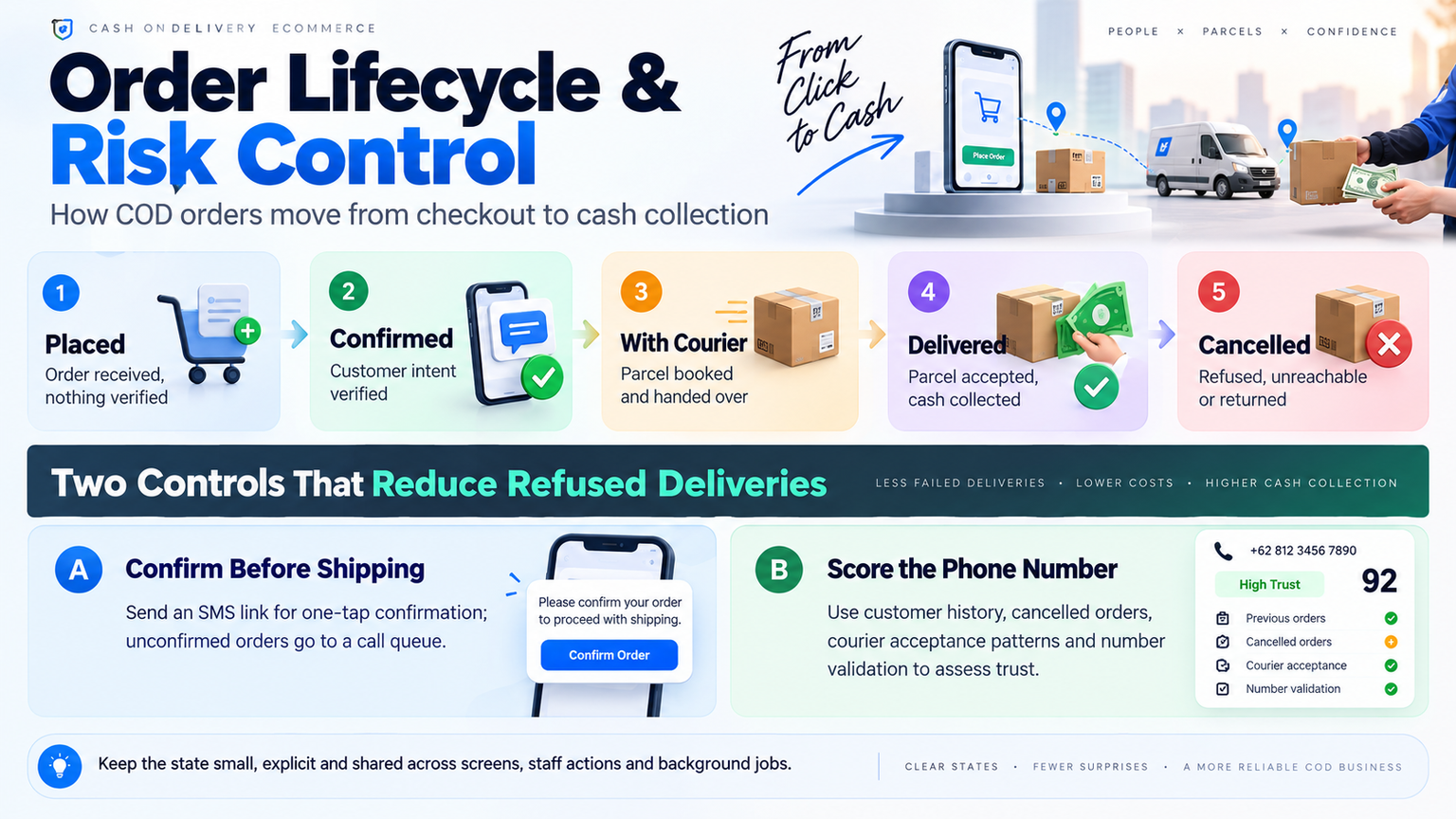
Model the stages the business actually experiences rather than the two or three a generic order status offers. A workable lifecycle has five states.
Stage
Meaning
What moves it forward
Placed
Order received, nothing verified
Customer taps a confirmation link, or staff confirm by phone
Confirmed
Customer intent verified
Staff pack the items and book a courier
With courier
Parcel booked and handed over
Courier reports delivery
Delivered
Parcel accepted, cash collected
Payment is recorded against the order
Cancelled
Refused, unreachable or returned
—
Keep the state small and explicit, and attach it to the order so that every screen and every job reads the same truth.
Two implementation rules prevent subtle damage. Re-read the order immediately before writing to this state, because a webhook, a scheduled job and a staff member can all update the same order within the same second. And design the operations screen around the next action, not the record: a staff member opening an order should see which stage it is in and the one thing to do now, with the full detail folded away beneath it.
How Do You Reduce Refused Deliveries?
A refused parcel costs the outbound courier fee, the return fee, the packaging and a week of unavailable stock. Two controls do most of the work.
Confirm before shipping. When an order is placed, send an SMS containing a signed link that confirms the order in one tap. The signature — an HMAC of the order identifier with a server-side secret — means the link cannot be forged or altered to confirm someone else's order. Orders that are not confirmed by link go to a call queue. The link removes the easy calls from that queue, leaving staff to spend their time on the orders that need a conversation.
Score the phone number. Before a parcel is booked, show staff a simple score built from evidence the business already holds.
Signal
Effect on the score
Earlier orders from this number that were delivered
Raises trust
Earlier orders from this number that were cancelled
Lowers trust
The courier's own acceptance record for this number, where the courier exposes one
Blended with the store's history
No history anywhere
Flagged as a new customer, not as high risk
Number fails validation
Treated as high risk
Keep the score explainable. A label of "medium risk" is less useful than "one delivered order, two cancelled, courier record 4 of 9 parcels accepted" — staff act on reasons, not on numbers.
How Should Courier Integrations Be Designed?
Courier APIs are simple to call and easy to integrate badly. The failures cluster in four places.
Order the booking steps so that nothing is lost. Booking a parcel involves an external call that cannot be undone, followed by several internal writes. Persist the courier's consignment number the instant it is returned, before creating shipments, sending SMS or updating anything else. If a later step fails, the order still knows its parcel exists and a retry does not book a second one.
Make booking idempotent. Send a stable invoice reference derived from the order number, and refuse to book an order that already carries a consignment. A double click should never produce two parcels.
Map statuses deliberately. Each courier reports dozens of raw statuses; reduce them to the handful the business cares about and decide what each one means for money. A partial delivery is not a delivery. An error or an unrecognised status is not "in transit" — treat it as unknown and leave the previous state untouched.
Combine webhooks with polling. Accept the courier's status webhook where one exists, authenticate it with a shared token, and also poll open parcels on a schedule. Webhooks are fast and occasionally missing; polling is slow and reliable. Put a timeout on every outbound call so that a slow courier API cannot stall the order screen.
Finally, treat returned parcels as work, not as an ending. A parcel the courier marks as returned should surface in the operations queue until someone has restocked it and closed the order.
How Should Online Payments Be Verified?
Customers who prefer to pay in advance will use a local wallet or card gateway, and that payment is a round trip: the customer leaves the store, pays on the gateway's page and is redirected back.
Do not trust the redirect. A browser can be closed mid-journey, a return URL can be replayed, and a query string that says "success" proves nothing. When the customer returns, the server must ask the gateway directly whether that transaction was paid, for that amount and in that currency, and complete the order only on that answer.
Where the gateway offers a server-to-server payment notification, handle it as an independent path to completing the order, so that a customer who pays and then loses their connection still has an order. Because two paths can now complete the same order, make completion idempotent. One smaller detail catches many teams: the session cookie must survive the cross-site redirect back from the gateway, which means its same-site policy has to allow top-level navigation.
How Should SMS Be Engineered?
SMS is the primary customer channel, a direct cost and a regulated medium, and it deserves the engineering attention e-mail usually receives.
Write to the segment. Messages in a non-Latin script are encoded as Unicode, which allows 70 characters in a single message; a longer text is split into parts and billed per part. Draft every template to fit one segment.
Never let a message break an order. Messaging helpers should catch their own failures and log them. An unreachable SMS gateway must not prevent an order from being placed or a parcel from being booked.
Keep one sending function. Every message passes through the same function, which normalises the number, tags the template and records the attempt. Provider changes then touch one file.
Log instead of sending in development. Without credentials, the system should print the message it would have sent. Developers can then test complete flows — including one-time codes — without a gateway account.
Record consent. Transactional messages about an order are expected. Marketing messages, such as cart reminders, require consent captured at checkout and stored with the cart.
What Does the Storefront Need on a Phone?
The overwhelming share of traffic in these markets arrives on a phone, often a mid-range Android device on a variable connection, and the storefront should be designed for that device first rather than adapted to it.
Build the interaction model customers already know from native apps: a bottom tab bar, sheets that rise from the bottom edge, a visible pressed state on everything tappable, and a header that steps out of the way on scroll. Self-host the fonts — particularly the local-script typeface — so that the first render never waits on a third-party server. Set prices in the local currency in the form customers expect, and test every page at a narrow phone width for horizontal overflow.
Two additions extend the reach cheaply. A progressive web app lets customers install the store to their home screen without an app-store listing, and a thin Android wrapper around the same site adds haptic feedback and keeps the payment round trip inside the app. Accessibility is not optional at any size: check colour contrast against WCAG AA, and automate that check so that a later design change cannot quietly break it.
The contrast ratios to automate against are defined in the WCAG 2.2 success criteria.
How Do You Test a Platform That Depends on External Services?
A cash-on-delivery order touches a payment gateway, one or more couriers and an SMS provider before it is complete. Their sandboxes are rarely dependable enough to run an automated suite against, and no team wants a test texting real customers.
Build a small mock server that impersonates each external service, and make the base address of every integration configurable. Pointed at the mock, the full stack can run an order from checkout to delivery on a laptop: the mock gateway approves the payment, the mock courier accepts the booking and later reports delivery, and every message the system "sent" can be read back and asserted on. Guard the tests that send SMS so that they run only against the mock.
On top of that foundation, an end-to-end suite should cover the journeys that earn money — checkout with its validation and totals, phone sign-up and sign-in, the confirmation link, and the operations flow from confirmation through courier booking to delivery — alongside accessibility checks and a layout check at phone width.
What Is a Practical Implementation Roadmap?
Phase 1: Discovery and workflow mapping
Sit with the staff who process orders and record every step after checkout: who is called, what is re-typed, where orders stall. Fix the lifecycle states and the delivery zones before any interface is designed.
Phase 2: Foundation
Stand up the commerce engine, database and storefront shell. Import the catalogue, implement phone-based identity and the single messaging function, and configure cash on delivery as the default payment path.
Phase 3: The order desk
Build the confirmation link, the call queue, the risk score and the order screen that shows one next action. This phase delivers most of the operational value and should reach staff early.
Phase 4: Couriers and online payments
Integrate courier booking, status mapping, webhooks and polling. Add the wallet and card gateways with server-to-server verification. Build the mock server alongside, not afterwards.
Phase 5: Launch and hardening
Rate limit the public endpoints, automate backups and restore tests, run the end-to-end suite against the mocks on every change, and load test the storefront against a production build before traffic is switched over.
Where Geekssort Fits
Geekssort designs and builds headless commerce on Medusa and Next.js, custom software and multi-tenant SaaS platforms, with dedicated engineering teams based in Bangladesh serving retailers at home and clients across the US, UK and EU. The architecture in this guide is the one the team built for KeenCares, a Bangladeshi healthcare and wellness retailer that moved from a hosted storefront to a platform it owns — phone-based accounts, Bangla SMS, an order desk with risk scoring, Steadfast and Pathao booking, and bKash and SSLCommerz payments verified server to server. For a retailer whose store handles the checkout but not the business around it, a workflow assessment — where orders stall, what staff re-type, which fees recur — is the right starting point before any decision to build.
How that engineering capacity is staffed is a separate decision, and Why Startups Prefer Dedicated Development Teams sets out the trade-offs.
Frequently Asked Questions
What is the biggest risk in a cash-on-delivery store?
Refused and undeliverable parcels. Each one costs courier fees in both directions and ties up stock for the length of the round trip, which is why confirmation and risk scoring matter more than any storefront feature.
Should customers be required to create an account?
No. Guest checkout with a name, phone number and address should be the default. Accounts keyed to the phone number, with sign-in by one-time code, can be offered afterwards for order history and faster repeat purchases.
Is a confirmation call still necessary if there is an SMS link?
For some orders, yes. The link confirms the customers who are ready to commit and removes them from the call queue; staff then call only those who have not responded or whose phone number carries a poor delivery history.
Why not rely on the courier's webhook alone?
Webhooks are occasionally delayed, duplicated or never sent. Polling open parcels on a schedule guarantees that every order eventually reaches its true status, and the webhook simply makes that happen sooner.
Can a cash-on-delivery platform run on a single server?
For a single-vendor store in one country, yes. Run the application, database, cache and reverse proxy as containers on one server with automated backups, and document the shortcuts that would need to change before scaling to several.
If the plan is to serve several vendors from one deployment, the isolation requirements change, and How to Build a Multi-Tenant SaaS Platform from Scratch covers them.
How long does it take to build?
It depends on the size of the catalogue and the number of courier and payment integrations. The catalogue and storefront move quickly; the order desk, courier integrations and payment verification account for most of the engineering time and should be scheduled accordingly.
Choosing between in-house devs or outsource isn’t about which option is universally better—it’s about what fits your startup’s stage, budget, and goals. Learn the key differences, compare costs and flexibility, and use a simple framework to make the right decision.
Select 58 more words to run Humanizer.
Compare the top 10 ERP software for fashion and retail businesses in 2026. Explore features, pricing, inventory management, and omnichannel capabilities.




 ChatGPT
 Claude
 Perplexity
 Gemini
 Grok
Grok


 We’re happy to sign an NDA upon request.