

7 Reasons You Need Glamoora Salon Management Software
Discover 7 reasons why your salon needs Glamoora salon management software. Learn how unified online booking, POS billing, CRM, inventory, and analytics streamline daily operations.



11 min read
Key Takeaways
Salon management software helps salon owners connect appointments, billing, customers, staff, inventory, and reports in one system. Many salons still manage bookings through phone calls, Facebook messages, paper diaries, and separate billing records.
This creates missed appointments, unclear invoices, stock differences, and limited business visibility.
A busy salon does not only need more bookings. It needs a clear view of what happens between the first appointment request and the final payment.
This practical guide explains how to choose salon management software for a salon or beauty parlour in Bangladesh.
Before comparing software, understand the problems your salon faces every day.
Consider a salon where appointments arrive through Facebook, phone calls, and walk-in visits. The receptionist writes some bookings in a diary and keeps others inside message threads.
The owner checks sales through a separate spreadsheet after closing.Each record may look accurate on its own. However, the connections between them remain unclear.
A rescheduled appointment can disappear from the diary while the original booking remains in a conversation. The stylist may prepare for the wrong service or expect a customer who already cancelled.
Salon management software should give everyone an agreed record of the booking, service, bill, and payment. That connection matters more than an impressive dashboard.
Start by recording operational problems for seven working days. Note booking conflicts, corrected invoices, missing stock entries, and time spent preparing closing reports.
Include the person responsible and the practical consequence of each problem.
This creates useful selection criteria without relying only on a vendor feature list.
For example, record how often reception interrupts a stylist to confirm availability. Measure how long the owner spends checking payment totals against receipts.
A small beauty parlour may need reliable scheduling and billing first. A growing salon chain may need branch reporting, controlled access, and stock transfers.
Avoid assuming every manual task needs immediate automation. Keep the process understandable before adding reminders, loyalty programmes, or complex commission rules.
A booking calendar should represent the work your team can actually deliver. Service duration, staff skills, breaks, and available equipment all affect capacity.
An empty time slot does not always mean a service can begin.
Imagine a customer booking hair colour followed by a treatment. The appointment may require preparation, application, processing time, and a wash station.
Ask whether the calendar can represent these stages without blocking resources unnecessarily. A good salon booking system should show realistic availability before reception confirms an appointment.
Test what happens when two staff members request the same slot at the same time. The system should prevent conflicting confirmations or clearly explain the conflict.
Online booking can give customers another way to request appointments outside opening hours. However, decide which services customers can book without a consultation.
Complex treatments may need staff review before the appointment becomes confirmed.
This protects both the customer experience and stylist time.
Feature availability and regional support still need checking for your chosen platform. A feature available in one market may not be available or supported in Bangladesh.
Keep reminder messages practical and brief. Include the service, appointment time, location, and a simple way to request changes.
Avoid filling essential appointment messages with unrelated promotions. Customers should immediately understand the purpose of the message.
Walk-in customers need the same visibility as advance bookings. Reception should record their arrival and assign a realistic service time.
Otherwise, the calendar can appear available while every stylist is already working. This creates waiting time and customer frustration.
Ask staff to simulate a late arrival, a cancellation, and an absent stylist. Watch whether they can update the schedule without starting again.
These ordinary disruptions reveal more than a carefully prepared sales demonstration.
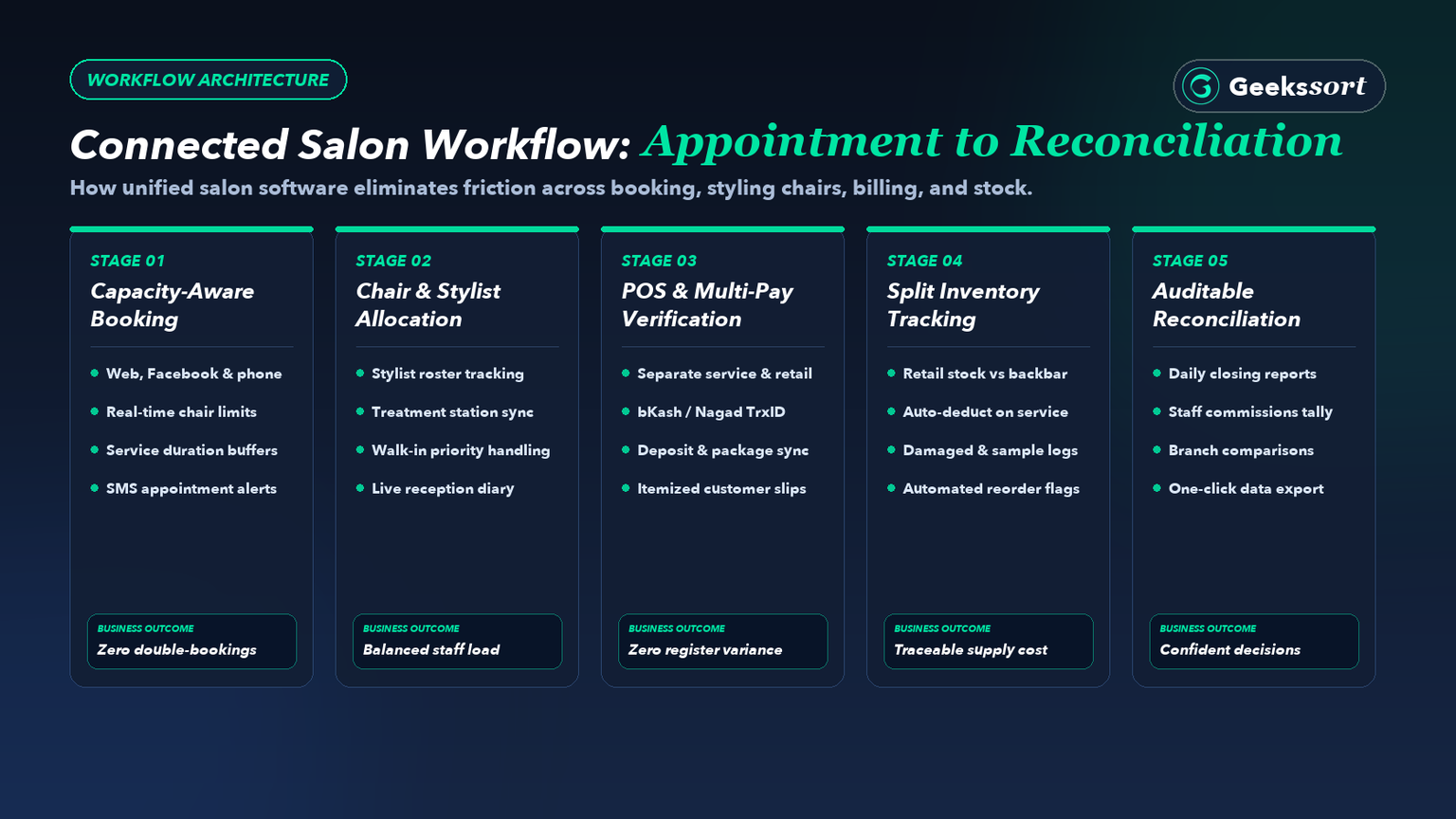
Checkout should carry forward the services actually completed during the visit. A receptionist should not rebuild the invoice from memory.
Products, discounts, deposits, and package redemptions also need clear entries. Every change should remain visible in the transaction history.
For example, a customer receives a haircut and buys a bottle of shampoo. The invoice should distinguish the service from the retail product.
The stock record should decrease only for the product quantity sold. It should not reduce service supplies unless the service workflow requires it.
Salon billing software should also preserve a clear history when invoices change. Ask who can apply discounts, issue refunds, or cancel a bill.
Check whether the record retains the employee, time, reason, and original amount. This improves accountability and reduces disputes.
For Bangladeshi salons, test cash, card, bKash, and Nagad workflows relevant to the business. Recording a payment method does not prove money reached the merchant account.
Automatic verification requires supported integrations and an appropriate merchant setup. Ask the provider to demonstrate a successful payment, a failed payment, and a delayed confirmation.
A pending transaction should remain distinguishable from a completed payment. Staff need a clear process when a customer shows a payment screenshot.
At closing, compare recorded collections with cash counted and confirmed digital transactions. Separate sales, refunds, deposits, and outstanding balances.
Differences should remain visible until someone investigates and records the resolution. This makes daily reconciliation more reliable.
Geekssort’s POS buying guide provides additional context for evaluating checkout systems. Apply the comparison to your salon service workflow, rather than choosing only based on retail features.
Finally, bring your required invoice layout to the demonstration. Ask the provider to show configurable business details, charges, and receipt fields.
Have your accounts team review the output before rollout. This helps avoid invoice problems after the system goes live.
Customer records should help staff prepare for the next visit. Useful details include previous services, preferred stylists, relevant preferences, and appointment history.
Avoid collecting information simply because the software provides an empty field. More fields do not always mean better customer service.
A returning customer might prefer a particular haircut length or appointment time. Accurate notes let the team maintain continuity when reception staff change.
They also reduce repeated questions that make an established customer feel unfamiliar. A good client profile should make the next visit smoother.
Salon management software can support this continuity when records stay organised and accessible to the right people.
Create a simple naming convention for service notes. Ask staff to record factual observations rather than personal opinions.
Handle sensitive customer information carefully. Limit access to relevant notes, explain why information is collected, and avoid placing private details in marketing exports.
Review account permissions whenever an employee changes responsibilities or leaves. This reduces the risk of unnecessary data access.
Duplicate profiles deserve attention during setup. A customer might appear under two phone numbers or slightly different spellings.
Review possible duplicates before merging them, because different people can share similar names. A wrong merge can damage customer history.
Packages and memberships also belong within the customer record. For a six-session package, staff should see purchases, completed sessions, remaining sessions, and applicable terms.
Keep service reminders separate from promotional campaigns. Record marketing preferences and provide a straightforward way to stop promotional messages.
Relevant communication is more useful than sending every offer to every customer.
Review customer retention through a consistent definition.
For example, track whether first-time visitors return within a chosen observation period.
Compare similar periods before concluding that a campaign improved loyalty or repeat business.
Salon inventory includes products sold to customers and supplies consumed during treatments. These flows need different handling.
Selling one shampoo bottle differs from using a small amount across several appointments. The system should support both retail sales and service consumption.
Separate retail stock from service stock during setup. Define units clearly, such as bottles, tubes, millilitres, or grams.
Inconsistent units make purchase records difficult to compare with actual usage. Clear units also make stock counting easier.
Ask how salon management software handles products opened for internal use. Moving a bottle from the retail shelf should create a traceable stock movement.
Otherwise, staff may mistake service consumption for an unexplained shortage. This creates confusion during stock checks.
For colour services, standard usage quantities can provide a starting estimate. Actual consumption can vary with hair length and treatment requirements.
Staff should be able to record justified differences without hiding the original estimate. This creates a more accurate product cost view.
Low-stock alerts need realistic reorder levels. Consider normal consumption, supplier delivery time, and occasional demand increases.
An alert is useful only when someone owns the purchasing decision and follows it through. Assign clear responsibility for reordering.
Run small physical counts regularly instead of trusting the dashboard alone. Compare counted quantities with recorded quantities and investigate differences.
Record breakage, expired products, samples, and corrections under separate reasons. This helps identify the cause of stock differences.
Inventory reports should also distinguish popular products from slow-moving stock. A large shelf balance can tie up money even when nothing appears missing.
Review purchasing quantities before repeating the previous month’s order automatically. Past purchase volume should not be the only planning input.
For several branches, test stock transfers between locations. The sending branch should record dispatch, while the receiving branch confirms the actual quantity received.
Unreceived transfers should remain visible until resolved. This is essential for reliable multi-branch salon software.
Start with your most valuable or frequently used products. Once staff follow the process consistently, expand the catalogue.
This makes stock control easier to maintain during busy service hours.
Salon staff scheduling should reflect skills as well as availability. Someone trained for haircuts may not perform every specialist treatment.
Service assignment rules should make these differences clear to reception. This reduces incorrect bookings and customer disappointment.
Salon management software should connect staff activity with understandable operational reports. Useful measures include completed appointments, service revenue, cancellations, discounts, and repeat bookings.
Review these measures together before judging individual performance. A single number rarely explains the full picture.
High sales alone do not explain a stylist’s contribution. Compare working hours, service mix, and responsibilities alongside revenue.
A team member handling longer treatments may complete fewer appointments while serving customers effectively. Performance review should consider the type of work performed.
Commission rules need equally clear definitions. Decide whether calculations use gross sales, discounted sales, collected payments, or another agreed basis.
Document how refunds, shared services, and package redemptions affect the calculation. Clear rules reduce staff disagreements.
Ask the vendor to calculate commissions from sample transactions. Check the results manually before using them for staff payments.
Employees should understand how their figures were produced and how corrections are handled. Transparency builds trust in the system.
Owners need a short daily view before detailed analysis. Start with appointments completed, collections received, unpaid bills, refunds, and stock exceptions.
Every unusual figure should lead to the underlying transaction. Reports should help owners investigate, not only display totals.
For multiple locations, compare branches using consistent reporting periods and definitions. Check whether central reports include cancelled transactions or deposits differently from branch reports.
Inconsistent definitions can create disagreements even when individual records are accurate. Use one reporting standard across the business.
Set permissions around responsibilities. Reception may manage appointments, while managers approve selected adjustments and owners access consolidated reports.
Individual accounts help identify changes and avoid the confusion of shared logins. This improves accountability across the salon.
Agree on a weekly review routine with the team. Use reports to choose a small number of improvements.
Then check whether those changes helped during the following review period. Continuous improvement becomes easier with consistent reporting.
Compare providers using the same written scenarios. Include a rescheduled booking, split payment, refund, package redemption, stock correction, and branch transfer where relevant.
Ask your own staff to perform the tasks during the demonstration. They will notice workflow problems faster than a sales presentation can reveal.
Before choosing salon management software, request a complete cost breakdown. Include subscriptions, additional users, branches, reminders, payment charges, hardware, setup, migration, and training.
Clarify which charges can change as the business grows. A low starting price may increase once the salon adds staff or branches.
Support arrangements matter during working hours. Ask how urgent problems are reported and what response commitments are included.
Confirm whether assistance covers configuration questions as well as technical faults. A salon needs practical help, not only software troubleshooting.
Test interruptions before going live. Ask which actions remain available without internet and how records synchronise afterward.
Offline billing does not automatically mean offline appointment coordination or payment confirmation. Test the exact workflows your salon needs.
Also request a sample data export. Check whether customer records, appointments, invoices, and stock movements remain readable outside the system.
Understand what happens to access and exports when the service ends. Your business data should remain accessible and usable.
Begin implementation with clean service names, prices, staff accounts, customer records, and opening stock. Assign one person to approve imported information.
Incorrect starting data can undermine otherwise useful reports. Clean setup data is more important than fast setup.
Pilot the workflow with a small team or one branch. Keep one authoritative record for each transaction and reconcile any temporary backup notes.
Avoid leaving competing records active indefinitely. Competing records create confusion and reduce trust in the new system.
Measure progress against the problems recorded before implementation. Compare booking conflicts, closing time, corrected bills, and unexplained stock differences.
Expand the rollout when staff can complete daily work confidently and records reconcile consistently. A careful rollout creates better long-term adoption.
Salon management software is most valuable when it solves real operational problems. It should connect bookings, billing, customers, staff, inventory, and reports in one reliable workflow.
For salons in Bangladesh, practical evaluation matters more than feature count. Test local payment recording, invoice needs, offline behaviour, staff permissions, and branch reporting.
Choose a system your team can use consistently. Clean data, clear responsibilities, and a phased rollout matter as much as software features.
Glamora by Geekssort is designed for salons that want a connected approach to appointments, POS billing, customers, inventory, and business insights.
It helps salons organise appointments, billing, customer records, stock, and staff activity. Included features vary between providers and plans.
Yes, when it solves recurring booking, billing, or recordkeeping problems. Start with essential workflows that your team can maintain consistently.
Some systems support integrations, while others only record the selected payment method. Ask for a demonstration of actual payment verification.
Some platforms provide shared customer records, branch reports, and stock transfers. Check permissions, branch charges, and transfer handling during evaluation.
Offline capabilities vary by product and feature. Test billing, appointment changes, and synchronisation before relying on offline operation.
Compare subscription fees, setup, migration, training, reminders, hardware, and payment charges. Include extra users, branches, support, and export arrangements.
If your appointment books, billing registers, and inventory records are spread across notebooks, messages, or separate tools, start by identifying the daily bottlenecks in your salon. Share your branch count, chair capacity, payment methods, and current workflows with our team.
Talk to Geekssort about Glamora and see how a connected salon management platform can help keep your appointments, sales, and supplies running smoothly.
Discover 7 reasons why your salon needs Glamoora salon management software. Learn how unified online booking, POS billing, CRM, inventory, and analytics streamline daily operations.

Compare the best 10 beauty salon management software platforms in 2026. Discover how modern salon booking, POS billing, CRM, and inventory tools simplify daily operations.

Poor retail visibility hides lost sales. Learn how a connected retail POS system brings sales, stock, customers, and branches into one view, and which daily checks turn those reports into decisions.

Ebrahim KhanFounder & CEO
 We’re happy to sign an NDA upon request.